Kaveri Online Services - Login, Registration, EC Download & Property Registration

Buying, selling, or verifying property in Karnataka is much easier today thanks to Kaveri Online Services, the official portal developed by the Department of Stamps and Registration, Government of Karnataka. Instead of making multiple visits to the Sub-Registrar Office, citizens can access essential property-related services online, including property registration, Encumbrance Certificate (EC) download, guidance value search, stamp duty calculation, certified copies, and appointment booking.

Whether you're a homebuyer, property owner, investor, or legal professional, the Kaveri Online Services Portal simplifies many property transactions while improving transparency and reducing paperwork. Most applications can be started online, with only the final verification or registration requiring a visit to the Sub-Registrar Office where applicable.

What is Kaveri Online Services?

Kaveri Online Services is the official digital platform for property registration and related services in Karnataka. Developed by the Department of Stamps and Registration, the portal enables citizens to complete many property-related tasks online, reducing paperwork and saving time.

The latest version, Kaveri 2.0, offers a faster and more user-friendly experience with improved online services. Users can create an account, download Encumbrance Certificates, estimate stamp duty, check guidance values, request certified copies, track applications, and book appointments for property registration through a single portal.

By digitizing these services, the Karnataka Government has made property transactions more transparent, efficient, and accessible for buyers, sellers, landowners, and other stakeholders across the state.
Key Features and Services Available on Kaveri Online Services

The Kaveri Online Services Portal brings multiple property-related services together on a single platform, making it easier for citizens to complete essential tasks online. From downloading property records to estimating registration costs, the portal helps reduce paperwork and saves time.

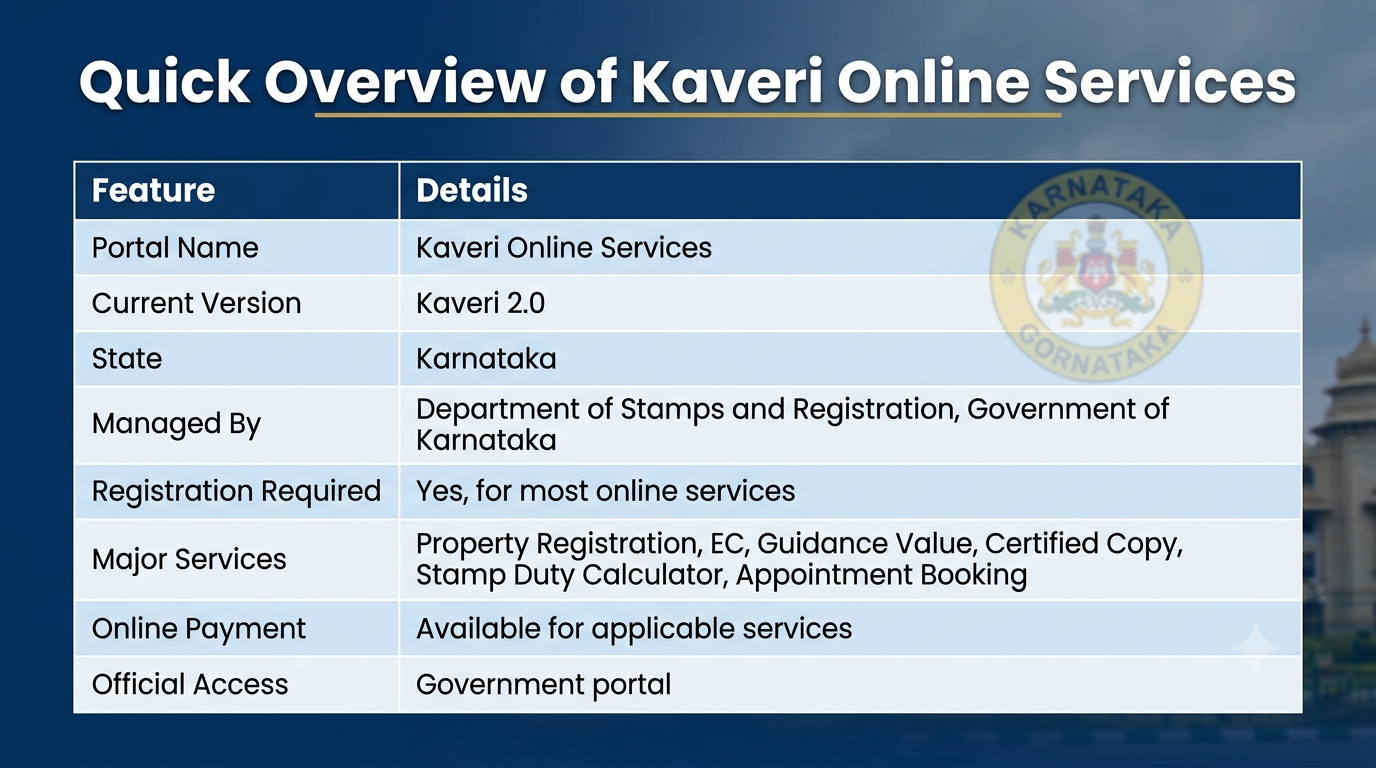
Quick Overview of Kaveri Online Services

Here's an overview of the major services available:

πŸ“„ Encumbrance Certificate (EC)

Check a property's transaction history and download the EC online.

🏠 Property Registration

Start the registration process for sale deeds, gift deeds, lease deeds, and other property documents.

πŸ’° Stamp Duty Calculator

Estimate stamp duty and registration charges before purchasing a property.

πŸ“ Guidance Value Search

Check the government-approved guidance (market) value of a property.

πŸ“‘ Certified Copy

Request certified copies of registered property documents.

πŸ“… Appointment Booking

Schedule a visit to the Sub-Registrar Office for document registration.

πŸ” Application Status

Track the progress of submitted applications online.

πŸ’³ E-Stamping & Online Payment

Pay applicable fees digitally through supported payment methods.

Benefits of Using Kaveri Online Services

Using the portal offers several advantages over the traditional offline process:

βœ“ Complete many property-related tasks from home.
βœ“ Save time by reducing visits to the Sub-Registrar Office.
βœ“ Access government property services through a single portal.
βœ“ Track application status online.
βœ“ Make secure online payments for eligible services.
βœ“ Improve transparency in property transactions.
βœ“ Download important property documents whenever required.

Whether you're purchasing your first home, selling property, or verifying ownership records, Kaveri Online Services provides a faster and more convenient way to access essential property services in Karnataka.

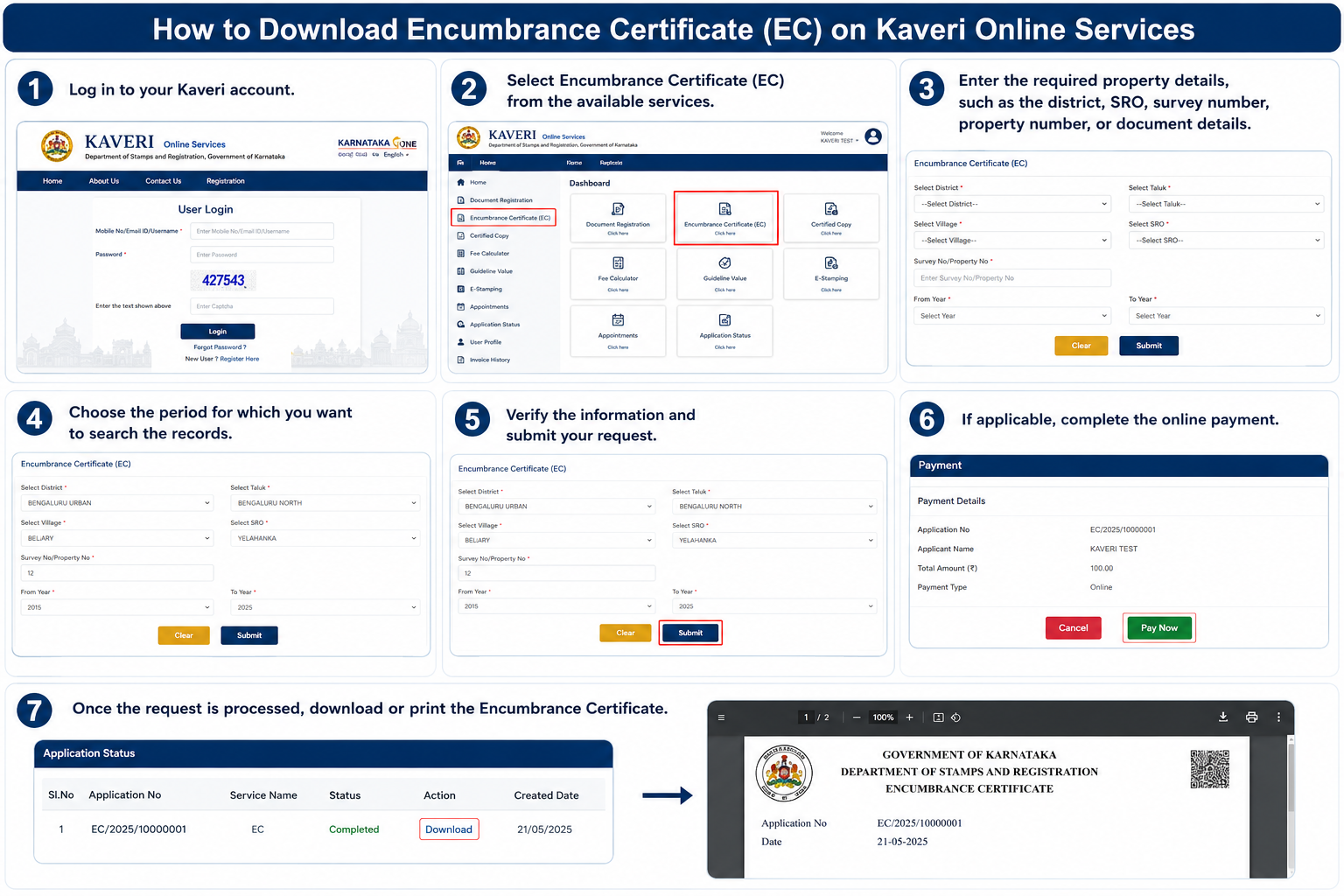
How to Download an Encumbrance Certificate (EC) on Kaveri Online Services

An Encumbrance Certificate (EC) is one of the most important property documents available through Kaveri Online Services. It provides a record of registered transactions related to a property during a selected period, helping buyers, sellers, and financial institutions verify its legal history.

How to Download Encumbrance Certificate

Why is an EC Important?

You may need an Encumbrance Certificate when:

  • Buying or selling a property
  • Applying for a home loan
  • Verifying ownership records
  • Checking if a property has any registered mortgage or legal liability
  • Completing certain legal or financial procedures

Reviewing an EC before purchasing a property is considered a good practice, as it helps you understand the property's registered transaction history.

Steps to Download an EC

Downloading an Encumbrance Certificate through Kaveri Online Services is straightforward.

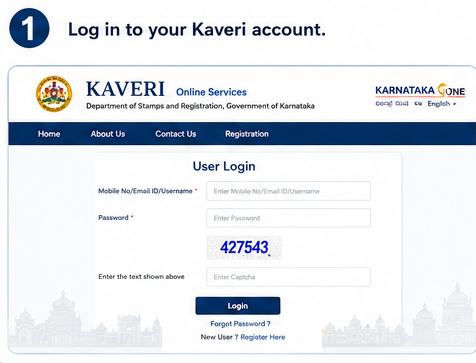
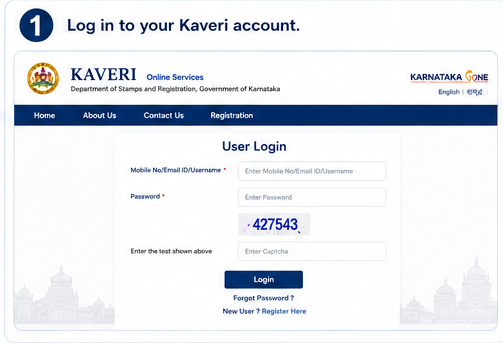
Step 1. Log in to your Kaveri account.

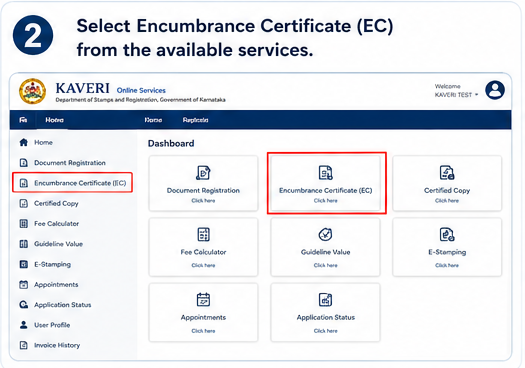
Step 2. Select Encumbrance Certificate (EC) from the available services.

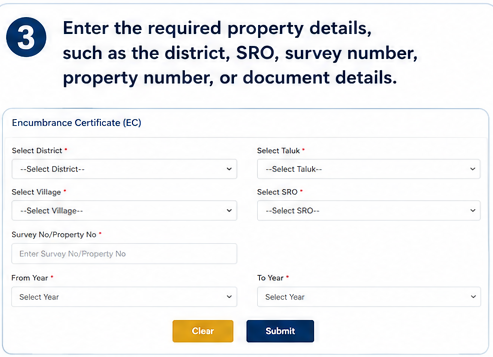
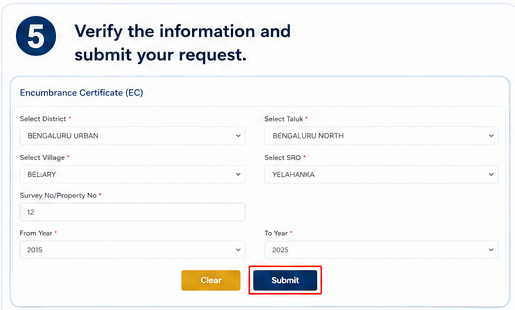
Step 3. Enter the required property details, such as the district, Sub-Registrar Office (SRO), survey number, property number, or document details.

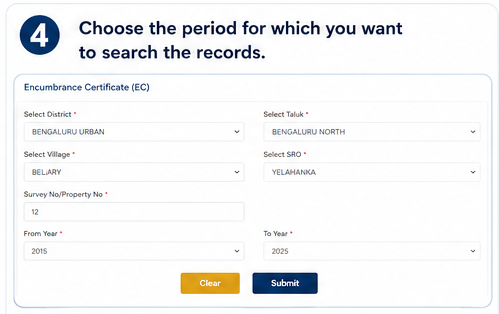
Step 4. Choose the period for which you want to search the records.

Step 5. Verify the information and submit your request.

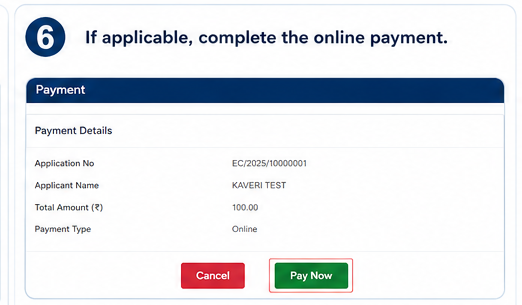
Step 6. If applicable, complete the online payment.

Step 7. Once the request is processed, download or print the Encumbrance Certificate.

Tip: Always verify that you've entered the correct property details before submitting the request to avoid incorrect search results.

Property Registration Through Kaveri Online Services

The Kaveri Online Services Portal allows users to begin the property registration process online, making it easier to prepare documents and book appointments before visiting the Sub-Registrar Office.

Although much of the process can be completed digitally, the final registration typically requires the parties involved to appear before the concerned Sub-Registrar Office for identity verification and other legal formalities, as per applicable government procedures.

Property Registration Through Kaveri Online Services
Important: Online registration simplifies the application process, but the final registration generally requires a visit to the concerned Sub-Registrar Office with the original documents.

Property Registration Process

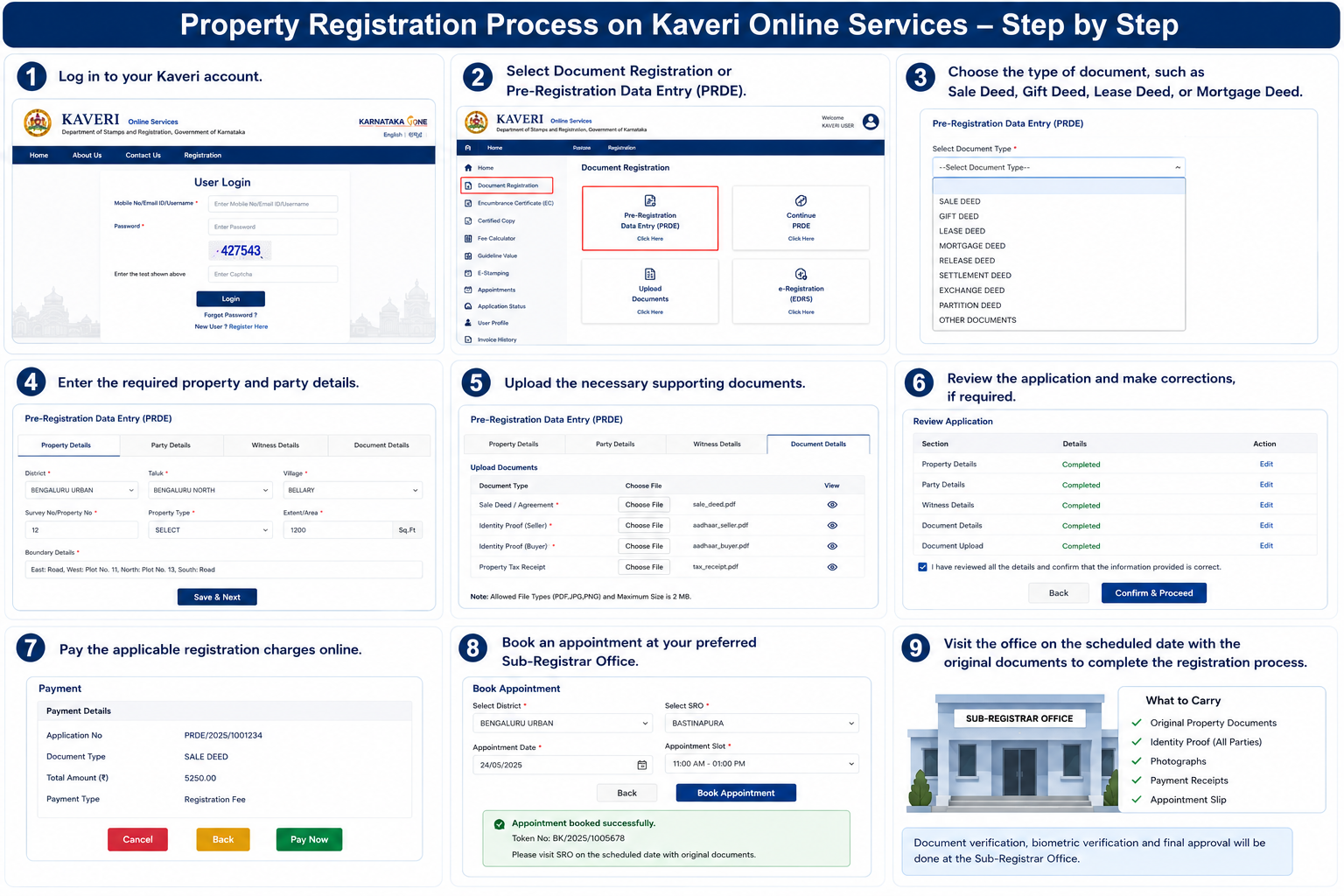
Follow these steps to register a property through the portal:

Step 1. Log in to your Kaveri account.

Property Registration Step 1

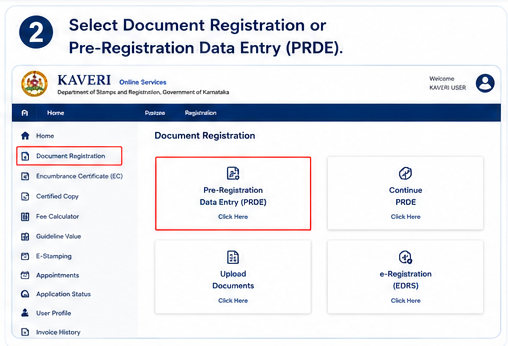
Step 2. Select Document Registration or Pre-Registration Data Entry (PRDE).

Property Registration Step 2

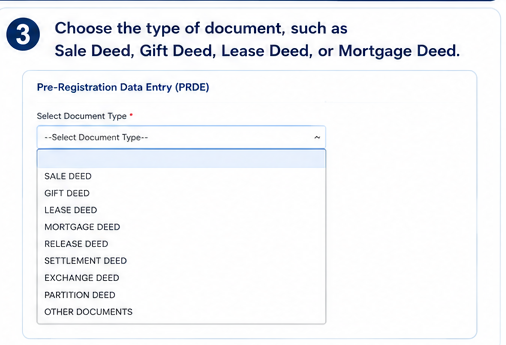
Step 3. Choose the type of document, such as Sale Deed, Gift Deed, Lease Deed, or Mortgage Deed.

Property Registration Step 3

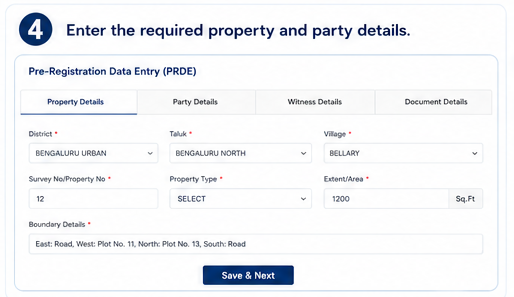
Step 4. Enter the required property and party details.

Property Registration Step 4

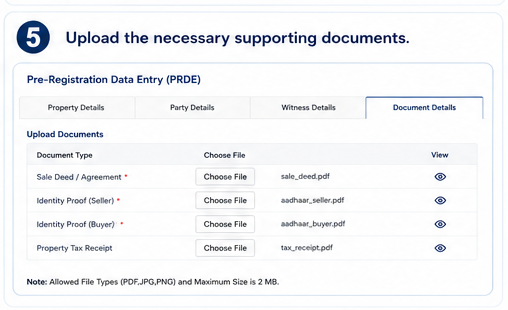
Step 5. Upload the necessary supporting documents.

Property Registration Step 5

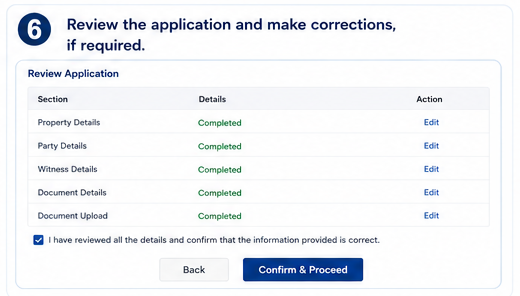
Step 6. Review the application and make corrections, if required.

Property Registration Step 6

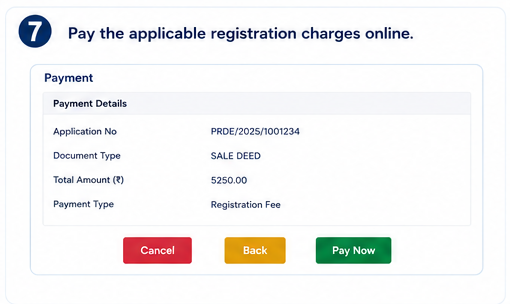
Step 7. Pay the applicable registration charges online.

Property Registration Step 7

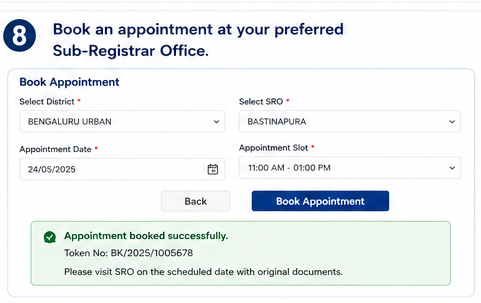
Step 8. Book an appointment at your preferred Sub-Registrar Office.

Property Registration Step 8

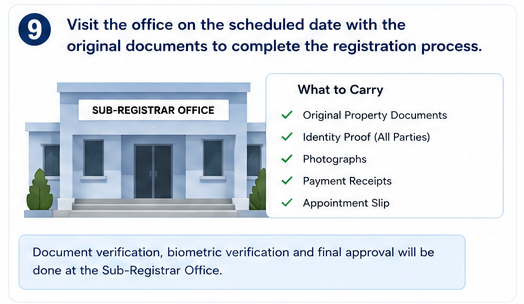
Step 9. Visit the office on the scheduled date with the original documents to complete the registration process.

Property Registration Step 9

Documents Commonly Required

Depending on the type of transaction, you may be asked to provide:

πŸ“„ Aadhaar Card or other valid identity proof
πŸͺͺ PAN Card
🏠 Sale Deed or relevant property document
🧾 Property Tax Receipt
πŸ“‘ Encumbrance Certificate (if required)
πŸ“‹ Khata Certificate (where applicable)
πŸ“· Passport-size photographs
πŸ‘₯ Witness identity proof
πŸ“ Other supporting property documents
Note: Keeping these documents ready in advance can help ensure a smoother registration process.

Other Useful Services Available on Kaveri Online Services

Apart from property registration and Encumbrance Certificates, the Kaveri Online Services Portal offers several other services that make property-related work more convenient. These tools help users estimate costs, access official records, and track applications without visiting government offices repeatedly.

Stamp Duty Calculator

Kaveri Online Stamp Duty Calculator

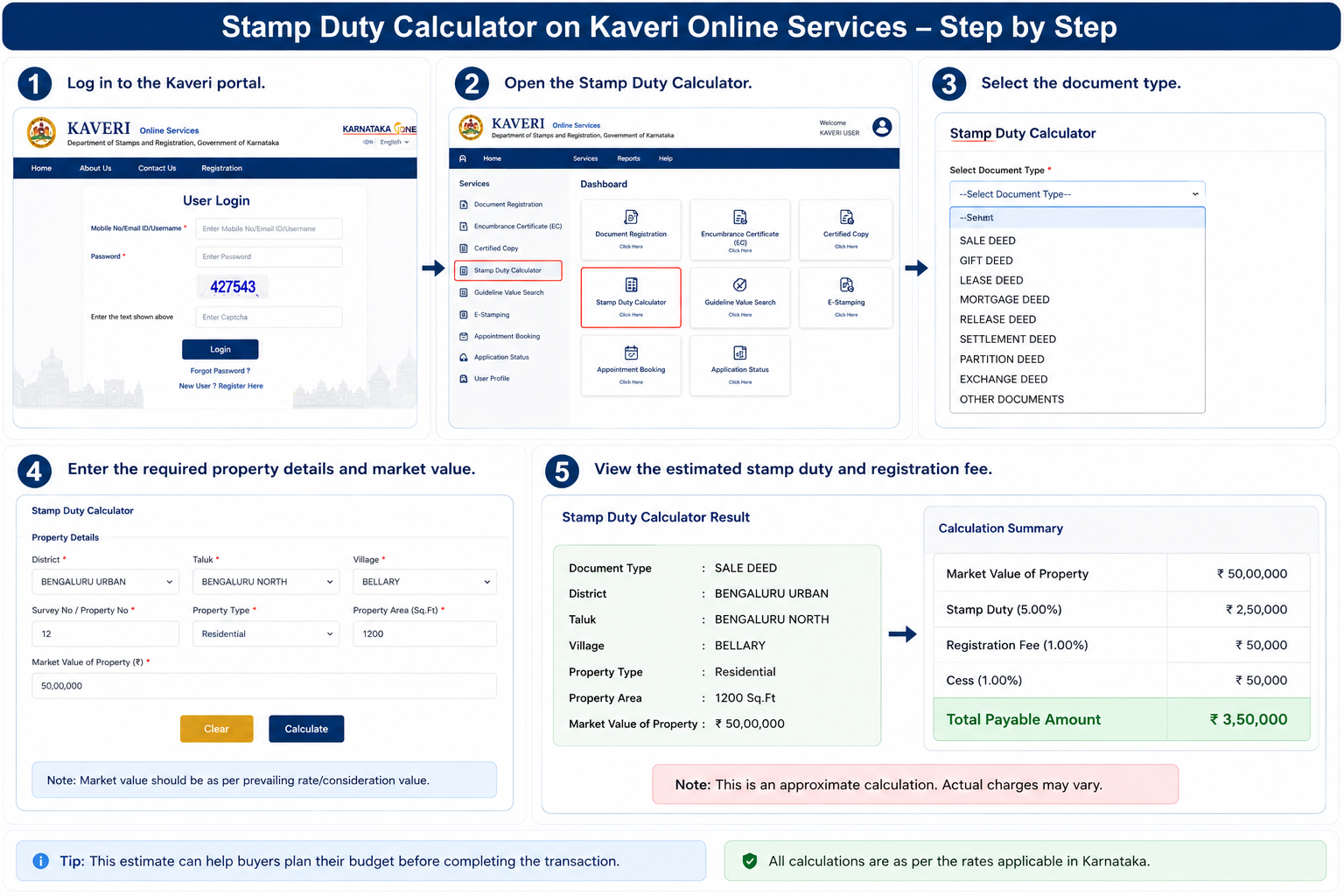
Before purchasing or registering a property, it's important to estimate the registration expenses. The portal includes a Stamp Duty Calculator that helps users calculate the approximate stamp duty and registration charges based on the property's value and document type.

To use the calculator:

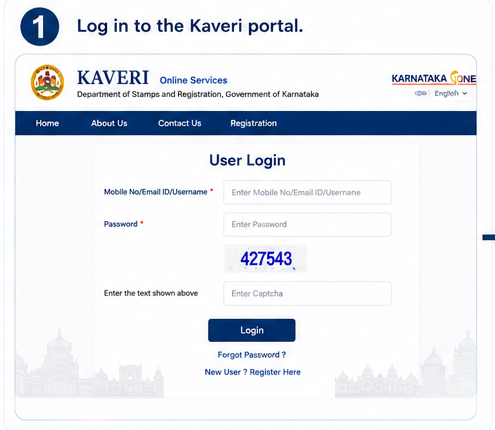
Step 1. Log in to the Kaveri portal.

Stamp Duty Calculator Step 1

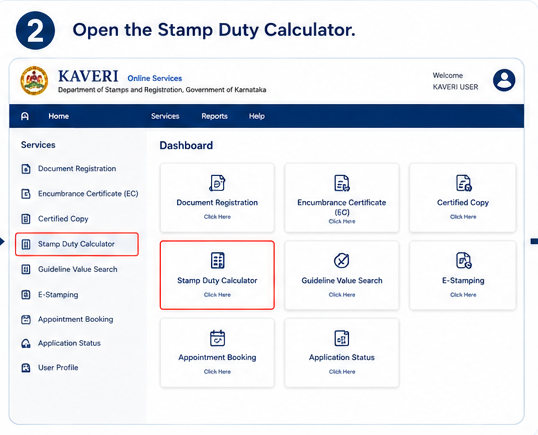
Step 2. Open the Stamp Duty Calculator.

Stamp Duty Calculator Step 2

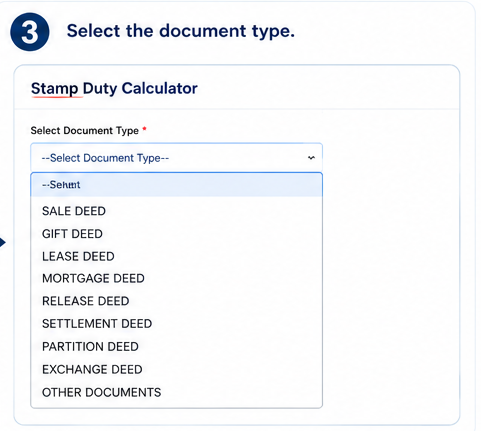
Step 3. Select the document type.

Stamp Duty Calculator Step 3

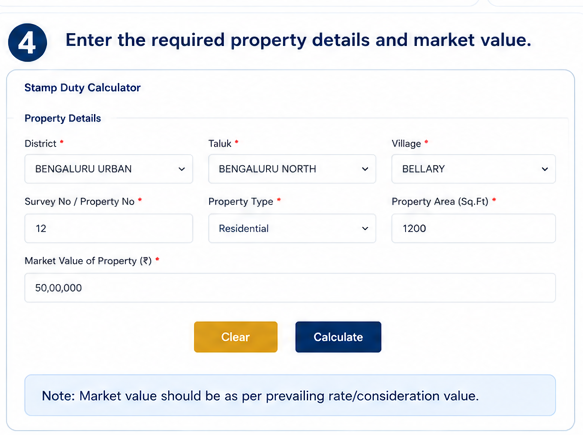
Step 4. Enter the required property details and market value.

Stamp Duty Calculator Step 4

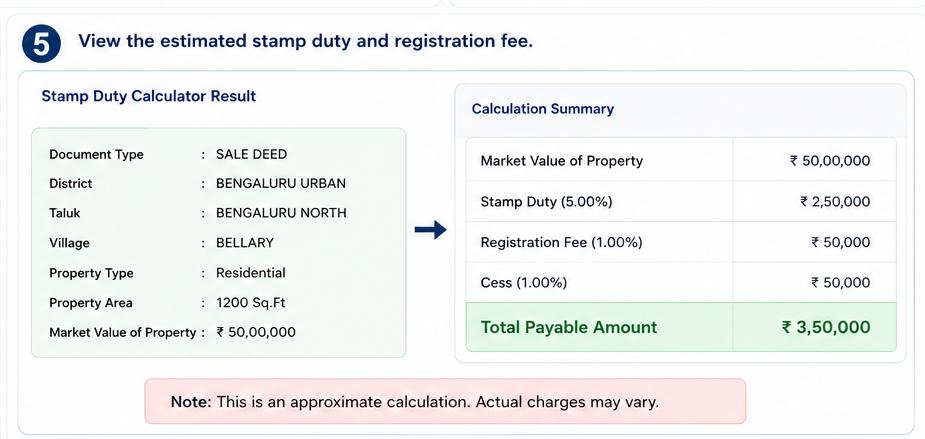
Step 5. View the estimated stamp duty and registration fee.

Stamp Duty Calculator Step 5
Good to Know: This estimate can help buyers plan their budget before completing the transaction.

Guidance Value Search

The Guidance Value is the minimum value fixed by the Karnataka Government for property registration. It is commonly used to calculate stamp duty and registration charges.

Using the Guidance Value search, you can:

βœ“
Check Property Value

Check the government-approved value of a property.

βœ“
Compare Market Prices

Compare market prices with guidance values.

βœ“
Estimate Registration Costs

Estimate registration costs more accurately.

Note: Simply enter details such as the district, locality, and property type to view the applicable guidance value.

Certified Copy of Registered Documents

If you need an official copy of a registered property document, you can request a Certified Copy through the Kaveri portal.

After submitting the request and paying the applicable fee, the document can be downloaded or collected according to the service guidelines.

Common Uses

  • Property disputes
  • Home loan applications
  • Legal verification
  • Ownership records
  • Personal reference

Application Status Tracking & Appointment Booking

πŸ“‹

Application Status Tracking

After applying for any service, you can monitor its progress online.

The Application Status feature allows users to:

  • Track pending applications
  • Check approval status
  • View completed requests
  • Monitor document processing
Simply enter your application or reference number to check the latest status.
πŸ“…

Appointment Booking

For services that require a physical visit, such as final property registration, the portal allows users to book an appointment online.

Booking an appointment helps:

  • Reduce waiting time at the Sub-Registrar Office.
  • Select a convenient date and time.
  • Complete registration more efficiently.
Always carry the required original documents when visiting the Sub-Registrar Office for your scheduled appointment.

Common Problems and Their Solutions

While using Kaveri Online Services, users may occasionally encounter technical or login-related issues. Most of these problems can be resolved with a few simple steps.

Problem Possible Solution
OTP not received Wait a few minutes, verify your mobile number, and request a new OTP.
Unable to log in Check your credentials or reset your password using the Forgot Password option.
Portal not loading Clear your browser cache or try using the latest version of Chrome, Firefox, or Edge.
Payment failed Check your bank account before making another payment. If the amount is deducted but the status isn't updated, wait for processing or contact the helpdesk.
Application not visible Refresh the dashboard or check the application status using the reference number.
Need More Help?

If the issue continues, you can contact the official Kaveri helpdesk or visit your nearest Sub-Registrar Office for assistance.

Tips for Using Kaveri Online Services

To ensure a smooth experience while using the portal, keep these tips in mind:

βœ” Use only the official Kaveri Online Services website.
βœ” Keep your mobile number and email address updated.
βœ” Double-check all property details before submitting any application.
βœ” Save copies of payment receipts and acknowledgment numbers.
βœ” Keep scanned copies of important documents ready before starting an application.
βœ” Book appointments in advance to avoid delays.
βœ” Use a stable internet connection and an updated web browser for the best experience.

Frequently Asked Questions (FAQs)

1. What is Kaveri Online Services?

Kaveri Online Services is the official property services portal of the Department of Stamps and Registration, Government of Karnataka. It enables citizens to access services such as property registration, Encumbrance Certificate (EC) download, guidance value search, stamp duty calculation, certified copies, and appointment booking online.

2. Is Kaveri 2.0 different from Kaveri Online Services?

Yes. Kaveri 2.0 is the latest version of the Kaveri Online Services portal. It offers a modern interface, improved performance, enhanced security, and additional online services compared to the earlier version.

3. Do I need to register before using the portal?

Yes. Registration is required to access most services, including downloading an Encumbrance Certificate, registering property, booking appointments, and tracking applications.

4. Can I download an Encumbrance Certificate (EC) online?

Yes. After logging into your account, you can apply for and download an Encumbrance Certificate by entering the required property details and completing the process on the portal.

5. Can I register a property completely online?

The portal allows you to complete most of the registration process online, including document entry, fee payment, and appointment booking. However, the final registration generally requires visiting the concerned Sub-Registrar Office for document verification and other legal formalities.

6. How can I check the guidance value of a property?

Use the Guidance Value Search available on the Kaveri portal. Enter details such as the district, locality, and property type to view the government-approved guidance value.

7. How do I calculate stamp duty and registration charges?

The portal includes a Stamp Duty Calculator that estimates the applicable charges based on your property's value and the type of document being registered.

8. What should I do if I forget my password?

Click the Forgot Password option on the login page, verify your registered mobile number or email address using OTP, and create a new password.

9. Can I track my application status online?

Yes. After submitting an application, you can use the Application Status feature to monitor its progress by entering your application or reference number.

10. Is Kaveri Online Services available across Karnataka?

Yes. The portal is designed for property-related services across Karnataka and can be used for transactions in all districts served by the Department of Stamps and Registration.

Conclusion

Kaveri Online Services has made property-related processes in Karnataka more convenient by bringing essential services onto a single digital platform. Whether you need to register a property, download an Encumbrance Certificate, check guidance values, calculate stamp duty, or request certified copies, the portal helps simplify these tasks while improving transparency and reducing paperwork.

Before starting any application, ensure that your property details and supporting documents are accurate. Using the official portal and following the correct procedures can help you complete your property-related work more efficiently and avoid unnecessary delays.

Elijah
About the Author

Elijah

Elijah is a writer who loves asking big questions and sharing what he discovers along the way. He writes about informationβ€”where it comes from, how it works, and why it matters. When he's not writing, he's probably reading, daydreaming, or deep in conversation about something interesting.